- Causes
- VoIP (Voice over Internet Protocol) latency or other network or hardware issues
- Speakerphone - sidetone = loop-back = feedback loop
- Solutions
- Turn off speakerphone
- Hang up and call back
- See also: Batteries ...
- Why you should really stop charging your phone overnight | ZDNet
- Charging Your Phone Overnight: Battery Myths Debunked | News & Opinion | PCMag.com
- Charging Your Phone Overnight: Battery Myths Debunked | PCMag
- Keep the phone battery charge between 30 and 80 percent to increase its lifespan.
- Current iPhones come with a 5-watt (that's 5 volts at 1.1 amps) charger block which works, but of course, you can charge faster with a 10W charger, which has an output of 5 volts at 2.1amps.
- Lithium-ion batteries perform effectively for around two to three years, and that's when the manufacturers would really like you to upgrade to a new phone.
- If you plan to swap phones every year or two, charge the stupid thing any way you want, as often as you want, and don't worry about the diminished capacity. However, if you want to stretch things out, use best practices for Lithium-Ion batteries as described in the article, above. It may help. Or, just take it in to and get a new battery installed every couple of years.
- WhatsApp
- WhatsApp won't do anything until the user gives FaceBook access to the entire contacts list, which then gets uploaded.
- Apple Messages
- Signal
- Signal demands access to contacts, too, but doesn't upload or store them--or so they say.
- What to Know About Signal
- Telegram Messenger
- Offline Messaging
- Mesh network using Bluetooth or WiFi. Like a walkie-talkie, but for text only.
- How to Text On Your Phone Without Cell or Wi-Fi
- Why You Should Use Peer-to-Peer Messaging Apps
- Briar - Secure messaging, anywhere - To add someone, you meet up and scan each other’s QR codes. Once that’s done, you can message one‑on‑one or make a group.
- Bridgefy � Mesh Network SDK for Mobile Apps
- MVNO = Mobile virtual network operator - Wikipedia
- Bell Canada
- Fibre Optic = Fiber Optic (USA)
- Internet connection - Bell as an ISP = FibIP + FibTV
- Fibre Optic = Fiber Optic (USA)
- Rogers Canada
- Telus
- See also: Recycle.htm ...
- See also: Disposal
- Preparation: Back up - Wipe - Clear internal memory - Reset all settings - remove SIM
- Amazon Trade-In: Get Paid for Your Used Items
- Apple
- Best Buy
- eBay: Cell Phones & Accessories
- Decluttr | Sell My Stuff | Sell Stuff Online
- EBGames.ca - GameStop store
- Gazelle | Recycle Cell Phones and Electronics for Cash | Gazelle
- Gizmogul.com | Sell My Cell Phone - Get Cash for Old, Used or Broken Cell Phones at Gizmogul.com
- Glyde | Simply buy and sell your games, iPads, iPhones and more
- NextWorth
- Rogers - Find Your Device
- Sphere | Sell Your Used Cell Phone for Cash Canada! - 326 West Cordova Street, Vancouver, BC V6B 1E8 - @Cambie
- Swappa - Buy & Sell - Phones, Laptops, Sneakers, & More
- uSell
- ---
- How to Sell Your Phone for as Much as Possible - How-To-Geek
- How to Trade In or Sell Your iPhone | WIRED
- How to Sell Your iPhone Safely | PCMag.com
- Best Buy Online Trade In for Computers, Cell Phones and More
- TechJunkie - iPhone Android Windows Tutorials and Tips
- How to Responsibly Dispose of Your Electronics | WIRED
- You can generally command the highest fees by selling directly to people through eBay, Craigslist, Facebook Marketplace, or Nextdoor. Just remember that you will need to arrange delivery or meet up to exchange the goods, and buyers often like to haggle.
- For a hassle-free sale, consider places like Swappa, DeCluttr, or GadgetPickup.
- How to Sell Your iPhone Safely | PCMag
- Your cellular package should include services for named caller ID for callers not in your address book. Named caller ID for people not in your phone book has been a value-added service for all of the wireless carriers for years. T-Mobile calls it Name ID; Verizon calls it Call Filter Plus.
- How to Stop Robocalls - Block Spam Calls to Cell Phone
- National DNCL : National do not call list
- Consumers can register for the DNCL or file a complaint about a telemarketer by calling 1-866-580-DNCL (3625) or visiting www.lnnte-dncl.gc.ca
- gethuman.com - When you're sick of pressing 10 or more options in order to reach a real person and spending many minutes or even hours on hold, consult the GetHuman database of secret phone numbers and codes that get an actual, live person on the line for customer service at nearly 1000 major companies.
- Wavelengths ...
- What is 6G and When Will it Come Out?
- What is 5G? - Morning Brew
- What Is 5G Technology - Intel
- Benefits of 5G Technology and Advantages of 5g Networks | Intel
- 5G mobile telephony: a primer - Common Ground
- Prices / Cost / Plans
- Rewheel/research
- Rewheel/research - Prices of 4G&5G smartphone plans
- Rewheel/research
- 2018 typical data speeds
- Telus home | Down 75-100 Mbps (sometimes goes over 110 Mbps), Up 15 Mbps
- Telus Cellular Wi-Fi | Down 70 Mbps, Up 4.5 Mbps
- Rogers Cellular 4G | Down ~25 Mbps, Up ~20 Mbps
- Top 5 terms to know about 5G - TechRepublic
- What is 5G? Everything you need to know | TechRadar
- Minimum expected | Down 1Gbps = 1000 Mbps
- Expected | Down 1-10 Gbps = 1000-10000 Mbps
- Possible? | Down 800 Gpbs
- What Is 5G? | PCMag
- The G in 5G means it's a generation of wireless technology. - cellular telephone networks
- The official 5G standard, known as 5G NR (new radio), probably won't come out until 2018, with full commercial rollouts in 2019 or 2020.
- 5G may give cellular carriers enough capacity to offer truly unlimited home service plans, as the data caps on current wireless plans just don't work for home use.
- The goal is to have far higher speeds available, and far higher capacity per sector, at far lower latency than 4G. The standards bodies involved are aiming at 20Gbps speeds and 1ms latency.
- Huawei, 5G, and the Man Who Conquered Noise | WIRED - Claude Shannon, Erdal Arıkan, Huawei
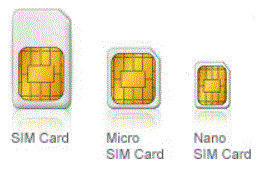
- SIM = eSIM = (subscriber identity module) card
- See also: Roaming/Traveling
- Check with your current wireless carrier.
- eSIM, or embedded/electronic SIM card, replaces the need for a physical SIM card - and therefore, a SIM card slot - on your device.
- An eSIM is basically a small chip inside your phone and works in a similar way to the NFC chip that's used for payment tech like Apple Pay and Google Pay.
- You must have your current carrier unlock your phone. The process can take up to two business days, but once it’s done, you’re free to take the phone to another wireless carrier.
- What is an eSIM? What it means for your phone or Apple Watch
- How to Use an eSIM for International Travel | WIRED
- How to Use an eSIM for Dual Phone Numbers | WIRED
- iPhone 14 eSIM: What you need to know - 9to5Mac
- iPhone 14 has no SIM slot in the US: Pros and cons of eSIM
- How to set up eSIM on your new iPhone 14 | TechCrunch
- aloSIM | Download eSIMs for travel data in 175+ countries
- AirhubApp.com | Best eSIM data and calling plans for Travellers
- Airalo | Buy eSIMs for international travel
- Unlocking
- $35 by your carrier. The manufacturer (Apple, etc.) can't unlock your phone.
- If Apple replaced your phone when repairing it, the phone is probably unlocked.
- Use iTunes to see if your iPhone is unlocked.
- Use a SIM from someone else's phone. If it works, your phone is unlocked.
- ATT 800-CALL-ATT
- BlackBerry ...
- Burner accounts
- Cell phones, cellular plans, and mobile accessories in Canada
- NET10 Wireless - Pay As You Go Made Simple
- Net10 Wireless
- RadioShack.com - Buy the phone from Radio Shack - USA only
- Rogers
- Verizon Wireless
- Virgin Mobile
- Buy a phone (e.g. from Radio Shack)
- You must top-up the card with $20 every 3 months
- $0.25/min for the first 10 minutes, then $0.10/minute anytime anywhere in North America
-
- Ten terrific things you can do with text messaging
- The New Pocket PCs | PCMag